Your iPhone app,
shipped in days.

Native SwiftUI. Fixed price. No deposits until you're ready.
Configure your app below and get a free quote in 24 hours.

From $600 fixed price
Days not months
No deposit until you approve
3 apps live in the App Store
App Name
What kind of app?
⚡ Auto-detected
Color Scheme
Custom
Number of Screens
6
Features
User Accounts
Payments
Push Notifications
Backend / Database
Maps / Location
Admin Dashboard
Your Logo (optional)
Drop your logo or click to upload It will appear on your app's splash screen
Logo Logo set. Showing on splash screen.
Estimated cost
$600
Live preview • tap dots to switch screens
Mockup is illustrative: your final app will look more polished.

Why not Fiverr or an agency?

Fiverr lists iOS apps for $100. Agencies quote $80,000. Neither is what a small business actually needs.

Fiverr / Offshore iOS Labs US Agency
Starting price $100–$500 listed, but always grows From $600 fixed, no surprises $40,000 to $200,000+
Code quality Templates, copied repos, no-code tools Native SwiftUI, written from scratch Professional, but you pay for it
App Store approval Rejections are common with template apps Built to guidelines from day one Usually approved
Who you talk to Strangers in a different time zone The developer building your app An account manager
Price transparency Balloons with every revision request Fixed price agreed before we start Hourly or milestone billing
After delivery Gone. Good luck with iOS 20. Post-launch support included Retainer at $10,000+/mo

How it works

Four steps from idea to App Store. No technical knowledge required on your end.

1
Get a quote
Use the builder above or fill out the quote form. We reply with a fixed, scoped price within 24 hours: no hourly estimates.
2
We design and build
Full UI design, native SwiftUI code, and any backend or API wiring your app needs. You get progress updates throughout.
3
You test and approve
Install and test the real app on your iPhone via TestFlight before anything goes public. Request tweaks until it feels right.
4
Ship to App Store
We handle submission from screenshots to review. Your app goes live, available to every iPhone user worldwide.

Shipped Projects

3 live in the App Store
BatchCut icon
BatchCut
Productivity · E-Commerce

Bulk background removal for product sellers on Shopify, Amazon, Etsy, and eBay. Resize and export to platform-specific specs in one tap. Built with a full subscription paywall, custom backend processing API, and StoreKit 2 in-app purchases.

SwiftUI StoreKit 2 REST API Firebase
BatchCut icon
StayOnIt
Productivity · Focus

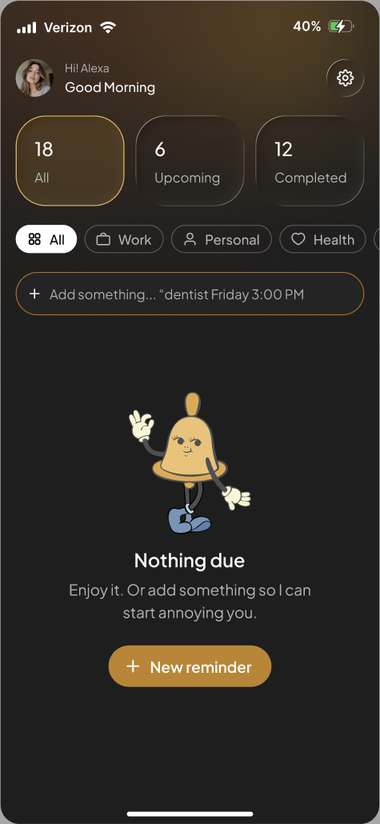
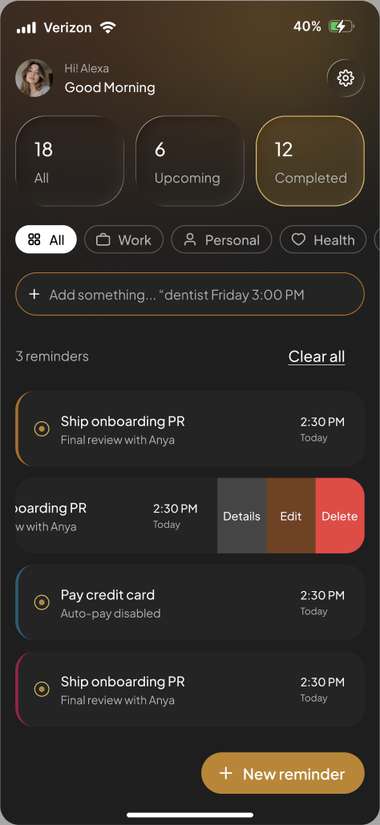
A focus app that follows up after missed reminders, escalating notifications until you complete the task. Features custom notification scheduling, streak tracking, and Live Activity support on the iPhone Lock Screen.

SwiftUI UserNotifications Live Activity WidgetKit
StayOnIt home screen StayOnIt reminders screen
SpiralRunner icon
SpiralRunner
Game · Arcade

An addictive arcade game with unlockable skins, a prestige system, and live leaderboards. Demonstrates that complex game mechanics, multiple monetization layers, and rewarded ad integration can all coexist cleanly in a native SwiftUI app.

SwiftUI Game Center Rewarded Ads In-App Purchases
SpiralRunner icon

Built for any type of business

Restaurant owners, gym operators, salon managers, agents, if your business serves customers on their phones, we've built something like it before.

Restaurants & Cafes
Digital menus, online ordering, loyalty punch cards, and reservation systems. Reduce friction between a hungry customer and a table.
Food & Beverage
Gyms & Fitness Studios
Class scheduling, membership management, workout logs, and push-based coach reminders. Retain members and reduce no-shows.
Health & Fitness
Salons & Spas
Appointment booking, service menus, loyalty rewards, and automated reminders. Fill your calendar without a front-desk phone call.
Beauty & Wellness
Real Estate Agents
Property listings, client portals, open house scheduling, and saved search alerts. Keep buyers and sellers engaged between meetings.
Real Estate
Retail & Boutiques
Product catalogs, in-store loyalty programs, mobile checkout, and order status notifications. Give customers a reason to come back.
Retail & E-Commerce
Healthcare & Therapists
Patient intake forms, appointment reminders, telehealth scheduling, and secure care notes. Streamline admin so you can focus on care.
Healthcare
Professional Services
Client portals, document requests, invoice tracking, and onboarding flows for consultants, lawyers, accountants, and coaches.
Consulting & Finance
Events & Entertainment
Ticketing, event schedules, guest check-in, and venue maps. Run smoother events and keep attendees in the loop from their pocket.
Events & Venues
Delivery & Logistics
Order management, driver dispatch, route progress, and real-time customer notifications. Coordinate your operation without the phone tag.
Delivery & Ops

What we handle

Custom iOS App Development
Native SwiftUI apps built to your exact requirements. Booking systems, loyalty programs, customer portals, and internal tools.
iPhone and iPad
Testing and Deployment
Crash-tested across device sizes and iOS versions. Nothing ships broken. TestFlight beta testing is included on every project.
TestFlight included
App Store Submission
Full App Store Connect setup: screenshots, metadata, privacy policy, age ratings, and submission. Done for you or guided step by step.
Done-for-you or guided
In-App Purchases and Subscriptions
Paywalls, subscriptions, and one-time purchases built with StoreKit 2. Your app can generate revenue from its first week in the store.
StoreKit 2
API and Backend Integration
Shopify, WooCommerce, Firebase, and custom REST APIs. We connect your app to the systems your business already runs on.
Firebase and REST
Ongoing Maintenance
Apple ships a new iOS every year. We keep your app running, catch bugs before your users do, and add features as your business grows.
Monthly retainer available
⚡ iOS Labs Kit  →

Build your own iOS app.
No guesswork. Ship in a day.

Not ready to hire us yet? Get the SwiftUI starter kit, 16 guided modules, and App Store walkthrough grounded in official Apple documentation, everything you need to go from zero to the App Store yourself.

📅
Built to be completed in one focused day. Sixteen modules, ~15.5 hours total. Xcode setup through App Store submission: plus backend, AI, and ASO when you're ready.
16Modules
~15.5 hrsTotal guided time
1 dayStart to App Store
$0Recurring fees
iOS Labs Kit
One-time purchase • Lifetime updates included
What's included
SwiftUI starter project (Xcode-ready)
16 step-by-step guided modules
App Store Connect full walkthrough
Cloudflare Workers serverless backend
Firebase auth, Firestore & storage
AI features with Claude integration
App Store Optimization (ASO) guide
Post-launch action plan
StoreKit monetization guide
12 rejection reasons & exact fixes
Lifetime updates as iOS evolves

Full curriculum: 16 modules

Everything you need, in the order you need it. Every step grounded in official Apple documentation.

01
Dev Environment Setup
Install Xcode, configure your Apple Developer account ($99/yr), connect a simulator, and run your first build. Every setting explained, every option clarified.
30 min
02
The Starter Kit · Your Project Foundation
Download the iOS Labs SwiftUI template. Walk through the file structure, navigation stack, component system, and how to make it yours in under an hour.
45 min
03
Planning Your App Before You Code
Map every screen, define your data model, and set your App Store positioning before writing a line. The step most people skip, and the one that causes the most wasted work.
30 min
04
Building Screens in SwiftUI
Build every screen your app needs using Apple's modern UI framework. VStack, HStack, SF Symbols, NavigationStack, sheets, animations. By the end, your app looks like a real product.
2 hrs
05
Data, State & Persistence
Make your app remember things between sessions. @State, @Observable, UserDefaults, SwiftData (Apple's newest persistence framework), and async/await networking.
1.5 hrs
06
Monetization with StoreKit
Charge for your app using StoreKit 2: Apple's official in-app purchase framework. Paywalls, subscriptions, restore purchases (required by Apple), and sandbox testing.
45 min
07
Backend & Auth (Optional)
Sign in with Apple, Firebase Firestore for cloud data. Required by Guideline 4.8 if you offer any social login. Skip entirely if your app works offline.
1 hr
08
Testing with TestFlight
Archive, upload, and install your app on your real iPhone. Invite up to 10,000 beta testers. Read crash reports. Catch what simulators miss before you submit.
30 min
09
App Store Connect: Full Submission
Screenshots (every required size), description, keywords, age ratings, privacy policy, App Privacy nutrition label, pricing, archive + upload. Your app in the review queue by the end.
1 hr
10
The Apple Review Process
What actually happens after you submit: automated checks, human review, Resolution Center, expedited review, and phased release to catch bugs before they reach everyone.
30 min
11
Rejections & Errors Reference
12 most common App Store rejection reasons with exact fixes. Xcode build error reference for signing failures, provisioning mismatches, and compiler errors.
45 min
12
Cloudflare Workers: Serverless Backend
Build a real API backend with no server to manage. Proxy third-party API keys, store data with KV or D1 database, deploy globally in one command. Free tier: 100k requests/day.
1 hr
13
Firebase: Real-Time Data, Auth & Storage
User accounts, live-syncing Firestore database, file storage, offline support, and security rules. Firebase Spark plan is free and covers most apps through the first significant milestone.
1.5 hrs
14
AI Features with Claude
Smart search, content generation, personalized recommendations. Route API calls through your Cloudflare Worker to keep keys secure. Streaming responses, tool use, system prompt design.
1 hr
15
Widgets & Push Notifications
Home screen and lock screen widgets with WidgetKit. Remote push notifications via APNs and Firebase Cloud Messaging. Two high-impact retention features to add after your first launch.
1.5 hrs
16
App Store Optimization (ASO)
Rank higher, convert more impressions to downloads. App name, subtitle, keywords, screenshot strategy, ratings, localization, Product Page Optimization A/B testing, and getting featured.
1 hr
Total guided time ~15.5 hours, one focused day
iOS Labs Kit
One-time purchase • Lifetime updates included
What's included
SwiftUI starter project (Xcode-ready)
16 step-by-step guided modules
App Store Connect full walkthrough
Cloudflare Workers serverless backend
Firebase auth, Firestore & storage
AI features with Claude integration
App Store Optimization (ASO) guide
StoreKit monetization guide
12 rejection reasons & exact fixes
Lifetime updates as iOS evolves

Rates

Fixed prices. No hourly billing, no change orders, no hidden fees. You know the full cost before we write a line of code. All plans split 50% upfront, 50% on delivery.

Starter
$600 to $1,200
Simple info apps, menus, basic utilities, and lightweight business tools.
  • Up to 6 screens, native SwiftUI
  • UI design included
  • TestFlight beta testing
  • Guided App Store walkthrough
  • 30-day post-launch support
50% to start • 50% on delivery
Get a Quote
Studio
$1,440 to $2,640
Booking systems, loyalty apps, customer portals, and feature-rich utilities.
  • Up to 14 screens, native SwiftUI
  • Everything in Starter
  • Custom animations and polished UI
  • One backend integration (Firebase or REST)
  • App Store submission handled for you
  • App Store screenshots and metadata written
  • 60-day post-launch support
50% to start • 50% on delivery
Get a Quote
Full Build
$3,000 +
SaaS platforms, multi-user apps, complex systems, and enterprise tools.
  • Unlimited screens
  • Everything in Studio
  • Full backend architecture
  • In-app purchases and StoreKit subscriptions
  • Admin dashboard
  • Multiple API and third-party integrations
  • Monthly maintenance retainer available
Payment plan available on request
Get a Quote

Not sure which fits? Use the builder at the top to estimate your app, or just describe it in the quote form and we will scope it for you.

Note on Apple Developer accounts: Publishing to the App Store requires a $99/yr Apple Developer account (one-time setup, paid to Apple). App Store submission and account setup assistance is included in Studio and above, or available as an add-on for Starter builds. You own the account and the app, we never publish under our own account.

Common questions

Do I need an Apple Developer account?+
Yes. Apple requires every published app to be associated with an Apple Developer account ($99/year, paid directly to Apple). We handle the setup process for you: or we can walk you through it step by step using our included guide. You own the account, and your app's revenue goes directly to you.
How long does it take?+
Turnaround depends on scope and how quickly feedback comes back. Starter builds can ship in a few days to a week. Studio builds typically take 1–2 weeks. Full Build projects run 2–4 weeks. Apple's App Store review adds 1–3 business days after submission. You'll get a specific timeline in your quote.
Do I own the source code?+
100%. The full Xcode project and all source code is yours the moment the final payment clears. We don't hold code hostage or charge for access. You can take it anywhere, hand it to another developer, or build on it yourself.
What if Apple rejects the app?+
Rejections are rare when you follow guidelines from the start, which is how we build. If Apple does reject, they provide a specific reason in the Resolution Center. We handle the resubmission at no extra charge: fixing whatever they flag is part of the job, not an add-on.
Can I submit the app myself and save on the add-on fee?+
Yes. The App Store submission add-on is optional on Starter builds. We'll provide you with a full step-by-step guide (with screenshots for every step) so you can walk through it yourself. It takes most people 2–3 hours the first time. Studio and Full Build include submission handled for you.
What's not included in the price?+
Three things are outside our fee: the Apple Developer account ($99/yr, paid to Apple), any third-party API costs your app depends on (e.g., Google Maps, Twilio, or Shopify subscription fees), and ongoing hosting if your app uses a custom backend server. We'll flag all of these before you commit.
Can I update the app after it's live?+
Yes, in two ways. You can hire us for individual update projects (quoted per change), or sign up for a monthly maintenance retainer, available on Full Build projects: which covers bug fixes, iOS compatibility updates, and small feature additions. We'll also advise you on what needs updating when Apple releases a new iOS version each September.
How is this different from a $100 Fiverr app?+
Fiverr apps at that price point are almost always copied templates, no-code builders dressed up as "development," or offshore work with no quality control. They frequently fail App Store review, break on newer iOS versions, and come with no support once paid. We write native SwiftUI from scratch, the same language Apple uses to build iOS itself: which means better performance, actual App Store approval, and an app that doesn't embarrass your business. The difference buys you a real product.
Do I need any technical knowledge?+
None at all. Our clients range from restaurant owners to therapists to real estate agents. You describe your business and what you need the app to do. We handle every technical decision, from architecture to App Store compliance. The only thing we'll ask of you: feedback on designs and access to your Apple Developer account.

Stop waiting. Your app can be live this week.

Most builds start at $600 and ship in days, not months. No agency markups, no long contracts. Just your app, built and in the App Store.

Get a Free Quote →
No deposit required • Quote delivered within 24 hours • You decide before anything starts

Two ways to ship your app.

Build it yourself with the kit, or have us build it for you, fixed price, no deposits until you're ready.

⚡ Do It Yourself
iOS Labs Kit
Everything you need to build and ship your own app: grounded in official Apple documentation.
16 guided modules (~15.5 hrs)
SwiftUI starter project (Xcode-ready)
App Store submission walkthrough
Cloudflare Workers + Firebase + AI
ASO guide + post-launch plan
Rejection fix reference + templates

Or fill out the form and we'll send a real, fixed price for your specific app within 24 hours. You decide before a single dollar changes hands.

Your Estimate
$600
Updates as you build your request
Done For You · Get a Quote
Core build: up to 2 features included

You're in the queue.

We received your request and will send a scoped quote to within 24 hours, a real number for your specific app, not a templated range.

1Check your inbox, look for an email from team@ioslabs.xyz
2We'll break down scope, timeline, and exact price
3You decide, no pressure, no deposits until you're ready
Back to builder →